Your download arrives
Right after checkout you get your template link and a step-by-step editing guide.
Canva video template
A heart-shaped letterboard, a teddy bear and an ultrasound sit on a cozy knit blanket, with "We're Expecting! Baby Miller, March 2026" in soft script. You change the words in Canva and download a vertical video ready for your feed or the family group chat.
$16

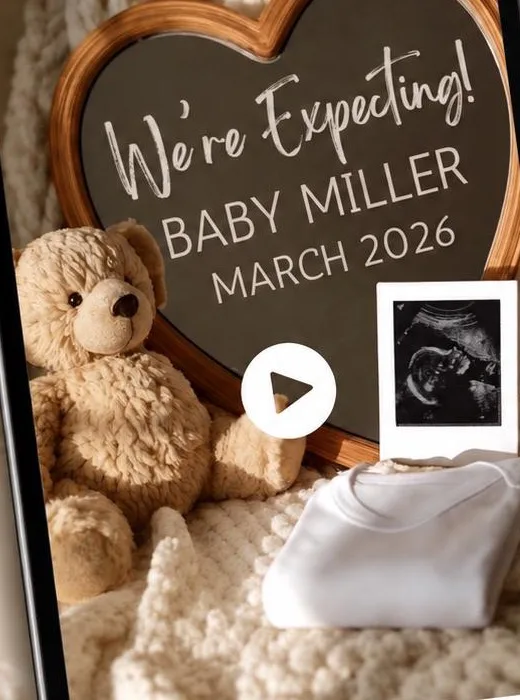
Shown with sample names. You change every word in Canva.
what you get
You finish a real video file, so it plays anywhere: in a post, a text thread or on the TV at family dinner. No editing skills needed.
Right after checkout you get your template link and a step-by-step editing guide.
The video opens in your own free Canva account. No Pro plan needed.
Change the words, fonts and colors to fit your family, like your last name and due month.
Export an MP4 in a few minutes, then post it, text it or play it on the TV.
make it yours
Made for
More video editions
how it works
1Download your file right after checkout. It has your template link and an editing guide.
 2
Open the template in a free Canva account and change the words, fonts and colors.
 3
Export an MP4 and share it on social, by text or on the TV.
good to know
No. The free version of Canva works for editing and downloading your video.
Yes. Download the MP4, then stream or screen share it to the TV. The video is vertical (4:5), so a widescreen TV will show black bars at the sides.
Yes. The fall edition has pumpkins, pampas grass and fairy lights, with room for your ultrasound photo. The Christmas edition is a 23-second holiday reveal where you can also change the ultrasound photo, music and timing.
Yes. The auntie edition is a 36-second video with music and heartfelt wording, made for telling your best friend or sister she is going to be an aunt.
Every order includes a step-by-step editing guide, and you can message the shop on Etsy anytime for help.
No. It is a digital template that you edit and download yourself. Nothing ships.
you might also like
A vintage slot machine that says "Our greatest win yet!" Twins edition too.
A soft sign in white roses for a pregnancy after loss.
Three spins of suspense, then the jackpot lands on boy or girl.
It's a digital download on Etsy. Make it tonight and send it whenever you're ready.